Questions or registration help?(608) 444-6575support@powerofinterest.com
Advanced free calculator

Irregular Payment Loan Calculator

Rebuild a real-world loan history with exact transaction dates. Add partial payments, late payments, principal-only payments, fees, credits, and additional advances, then see how every transaction changes accrued interest and principal.

Calculator reviewed: October 6, 2026•Developed and published by ERICH Incorporated•Loan & interest software since 1999

Your calculated results

The sample values calculate automatically. Change any input to evaluate your own scenario.

Need to take this calculation further?

Rebuild irregular real-world loan activity in Windows

Enter what actually happened—payments, advances, fees, credits, and rate changes—then rebuild the balance transaction by transaction and prepare a reconciliation report or payoff statement. $50 one-time purchase.

One-time purchase · No subscription · Secure payment through PayPal · Free evaluation available · Refund policy · License terms

Mathematical estimate only. Loan contracts can use different day-count, compounding, late-fee, capitalization, grace-period, payment-allocation, and rounding rules. Verify legal or contractual payoff figures against the governing documents.

From quick calculation to working file

Have a real payment history to rebuild?

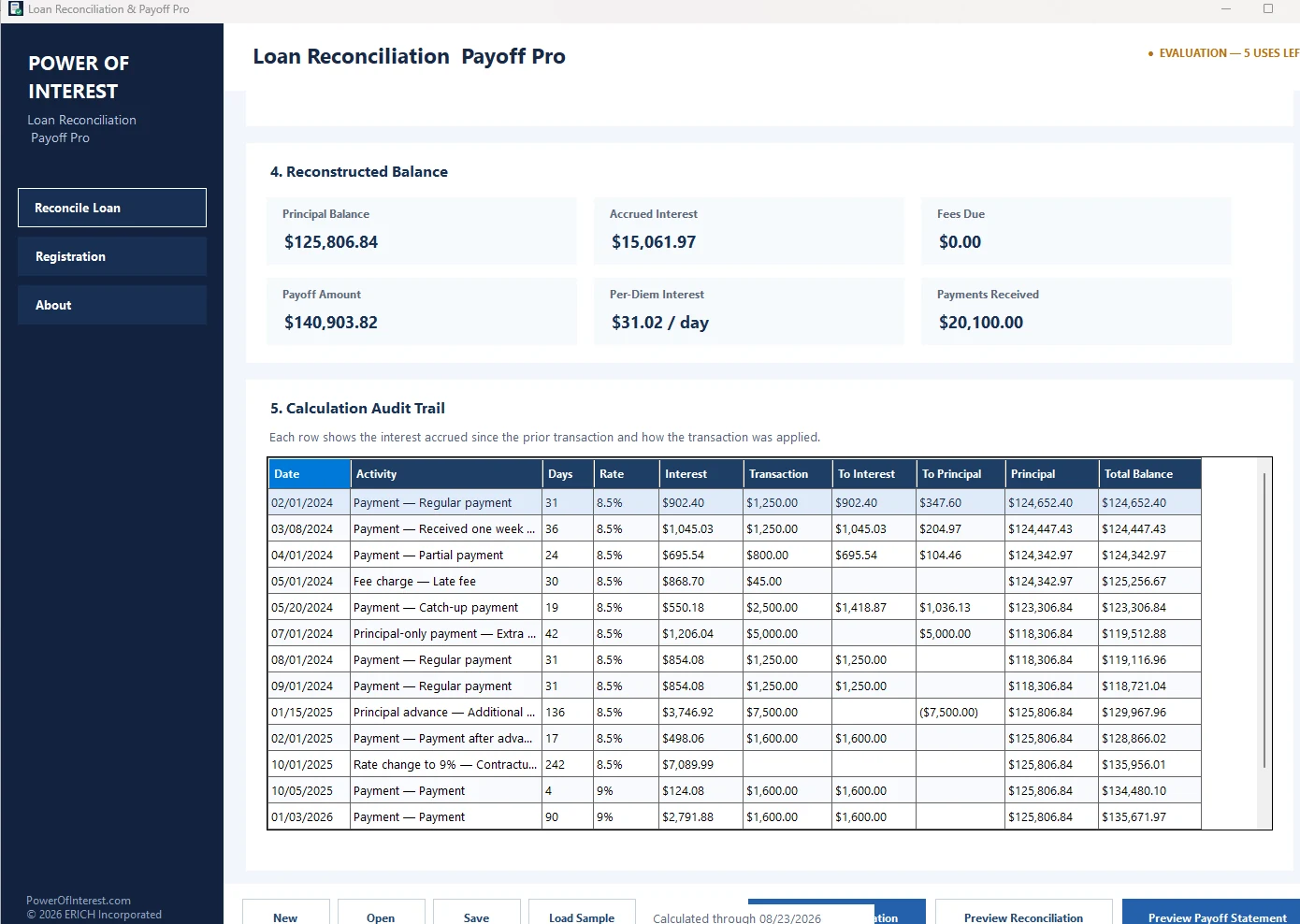
The online calculator is useful for a quick reconciliation. Loan Reconciliation & Payoff Pro is built for the heavier job: entering an irregular payment history, rebuilding balances, and producing a payoff.

  • Enter irregular payments and dates
  • Rebuild principal and interest
  • Calculate an accurate payoff
  • Save the loan for later work
$50 one-timeNo subscription

Try the evaluation before buying. One-time license; no monthly subscription.

Loan Reconciliation and Payoff Pro Windows software screen
Actual Windows software

Why this calculator is different

Reconcile the loan in the order events actually happened

Ordinary amortization calculators assume every payment arrives on schedule. Real loans often do not. A late payment changes the number of interest-accrual days, a principal-only payment changes every later per-diem amount, and an advance raises the balance that earns interest.

This calculator processes each dated transaction in chronological order. Before applying a transaction, it first accrues simple daily interest on the principal that was outstanding during that interval.

Interest for interval = Principal × Annual Rate × Days ÷ Day-Count Basis

The 365-day basis is common for actual-day calculations. Some notes instead use a 360-day convention. Use the convention stated in the loan documents.

Payment application matters

The calculator can apply ordinary payments to accrued interest before fees, or fees before accrued interest, with the remainder going to principal. Principal-only payments bypass accrued interest and fees. That distinction can materially change the running balance.

Need to save and document a real reconciliation?

Loan Reconciliation & Payoff Pro is designed for more detailed payment-history work, while Amortization Pro creates complete scheduled amortization tables.

More ways to use this calculator

Common calculation questions this page answers

Loan Calculator With Irregular Payments

Use actual transaction dates instead of assuming every payment arrived on schedule. The calculator accrues daily simple interest to each transaction, applies the transaction, and then continues from the resulting balance.

Reconstruct a Loan From Actual Payment History

A reconciliation answers a different question from a normal amortization schedule. It rebuilds what actually happened so you can identify the balance after late, skipped, partial, or extra payments.

Late, Partial and Principal-Only Payments

Late payments create additional accrual days. Partial payments may leave interest or fees unpaid. Principal-only payments reduce the balance used to calculate later interest.

Calculate a Payoff After Irregular Payments

After the transaction history is rebuilt, accrue interest from the last transaction through the selected payoff date to estimate the amount due. For a saved professional workflow, use Loan Reconciliation & Payoff Pro.

For a single unchanged balance, use Interest Between Dates. For a quick payoff extension from a known balance, use the Payoff Per Diem Calculator.

Frequently asked questions

How do I calculate a loan with irregular payments?

Accrue interest from one actual transaction date to the next, apply each payment or adjustment in chronological order, and carry the resulting principal and unpaid amounts forward.

How does a late payment affect loan interest?

A late payment normally leaves the prior principal outstanding for additional days, so more interest may accrue before the payment is applied.

How is a partial payment applied?

Application depends on the note or servicing rules. This calculator lets ordinary payments be applied to accrued interest and fees before the remainder reduces principal.

How does a principal-only payment affect future interest?

A principal-only payment reduces the balance immediately, so later daily interest is calculated on a smaller principal amount.

Can I add additional loan advances?

Yes. An additional advance increases principal from its transaction date forward.

Can I include fees and credits?

Yes. Fees can increase amounts due and credits can reduce them without treating every adjustment as principal.

Does unpaid interest compound?

Not in this calculator unless you explicitly enter a transaction that capitalizes it into principal. Verify the governing note because contracts can use different rules.

Can I calculate a payoff through a future date?

Yes. Select a calculate-through date after the final transaction to accrue additional daily interest and estimate the payoff.